Operations dashboard
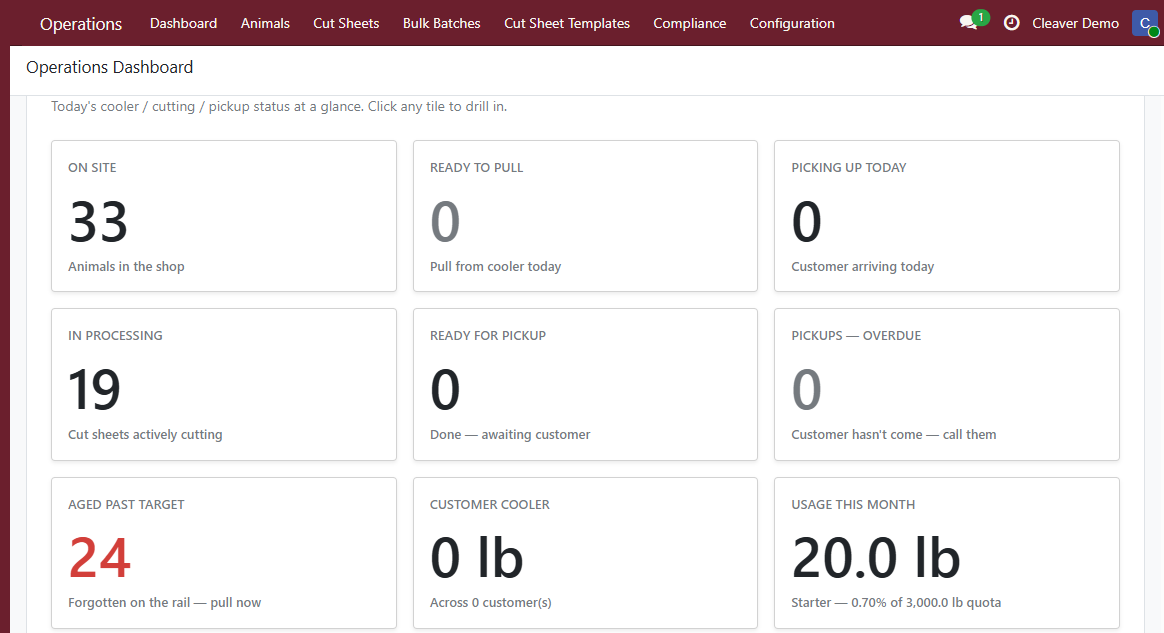
The Cleaver app lands on the Operations dashboard. Each number opens the matching list view so you can act on what you see.
The tiles
- Animals on site — every active carcass not yet picked up. Click to see what’s in the cooler.
- Ready to pull today — carcasses whose target aging completes today. Click to see exactly which ones to break down this morning.
- Aged past target — animals that should have been pulled yesterday or earlier. Cleaver doesn’t auto-act; this tile is a nudge.
- In processing — confirmed cut sheets with active pickings. Click to see the cutter’s worklist.
- Ready for pickup — staged deliveries waiting for the customer to walk in. Both cut sheets and bulk batches.
- Customer cooler — total kg / lb sitting in the pickup cooler, plus how many distinct customers it represents. Tracks fullness without inventory math.
- Pickups overdue — staged deliveries whose target date is in the past. Call the customer or apply storage fees.
- Pickups today — sale orders with today’s pickup date. Drives the day’s prep list.
Designed for the morning huddle
If you only open Cleaver once a day, open it here. The tiles answer the five questions every shop owner asks at start-of-shift:
- What’s in the cooler?
- What do we pull today?
- What’s overdue?
- Who are we expecting today?
- How full is the customer pickup cooler?