Charcuterie / MRP
Bacon, ham, smoked sausage — anything where you transform raw meat plus seasoning into a finished product through a defined process. Cleaver uses Odoo’s standard MRP module with a Charcuterie tab that adds cure days, smoke schedule, target water activity, and shelf life.
Build the BoM
Manufacturing → Bills of Materials → New. Pick the finished product (e.g., Bacon Cured + Smoked). Tick Charcuterie Recipe to reveal the extra fields. Add ingredient lines as percentages:
- lean 70%
- fat 25%
- cure 3%
- spice 2%
Total: 100%. Cleaver will scale them automatically when you change the batch size.
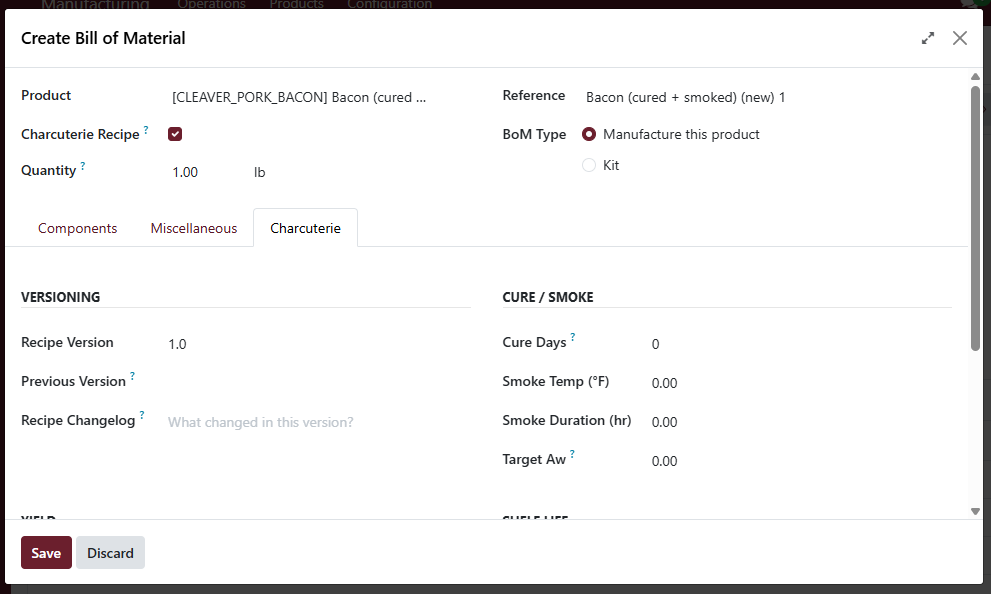
Cure days, smoke temp / duration, target water activity, shelf life, expected pack weight.
Run a manufacturing order
Manufacturing → Orders → New. Pick the BoM and the batch size in kg / lb. Confirm. Mark components consumed. When the run is done:
- Click Produce All
- The Assign Serial Numbers dialog asks you for the pack count plus pack weight — the weight you enter stamps onto every output serial in one go
- Click Mark Done to close out
The Pack Weight field pre-fills from the BoM’s Expected Pack Weight, so for repeat recipes you usually just confirm and move on.
Source-animal traceability
When you Mark Done, Cleaver walks every consumed raw lot back to its
source carcass and stamps that on the output serials. Bacon made from
Customer Smith’s hog will show CARC00006 on its label, even though
the recipe pooled a dozen batches.
Yield variance
On the MO form there’s a Charcuterie Yield tab that takes the actual finished weight after curing / drying. Compare to the BoM’s expected yield to spot variance early.