Bulk batches
When you grind trim from three carcasses into a 30 kg run of ground beef, a bulk batch is the record. Each carcass goes on its own line so yield-per-animal stays exact and a recall picks out every contributor in one query.
Shop-bulk vs customer-bulk
Bulk Batches → New. Pick the output product (e.g., Ground Beef 80/20).
- Leave Customer empty for shop-bulk that goes to retail inventory — it’ll be sold through POS.
- Set Customer to a specific partner for customer-bulk — the batch lands in the Customer Pickup cooler waiting for them to come collect it.
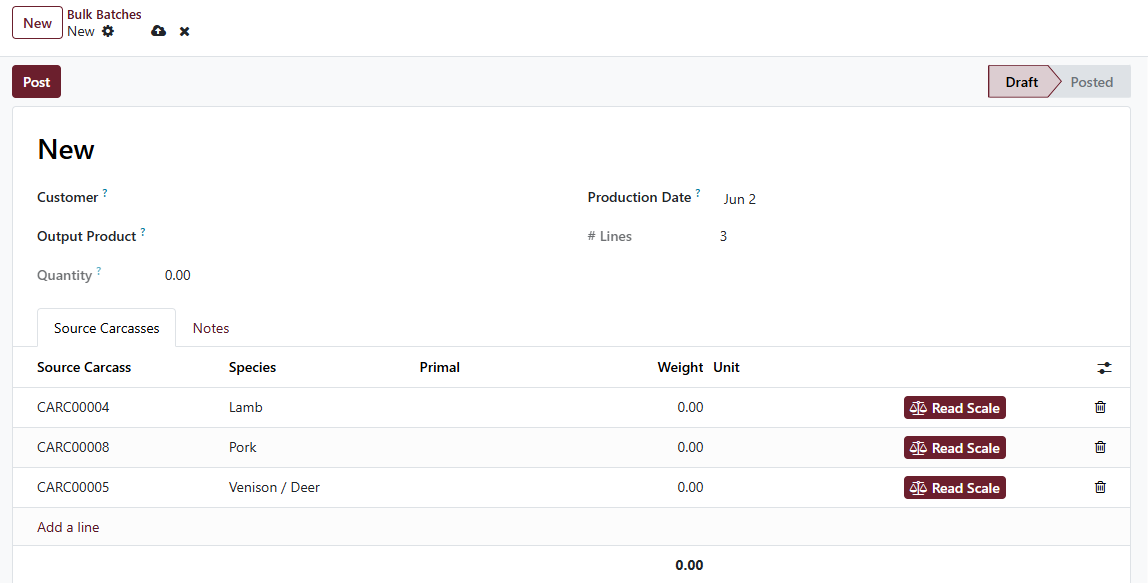
Bulk batch with three source-carcass lines. Click Read Scale on each line to weigh trim straight in.
Post the batch
Click Post. Cleaver creates a stock.lot for the output, stamps
the source carcasses on it (so recall works), and runs the inventory
pickings. Print the tub label from the form’s Print Label button:
- Customer-bulk prints a “READY FOR PICKUP” version with the customer’s name
- Shop-bulk prints a workshop tub label
The label prints on 4×6” thermal stock with the source carcass list spelled out for recall transparency.
Once posted, you cannot un-post
A posted bulk batch’s stock lots are live in inventory. Cleaver blocks:
- Deleting a posted batch
- Deleting any line on a posted batch
- Deleting a carcass that contributed trim to a posted batch
These rules exist because the recall trail must survive — there’s no admin override. If a posted batch needs to be reversed, the path is to do an inventory adjustment / scrap entry, NOT a delete. Email [email protected] if you find yourself needing this.